Help Center

Q: What is the Nex E Series and who is it for?

The Nex E Series is a plug-and-play home battery system designed to help reduce electricity costs through flexible energy storage. It can be used with or without solar panels.

It allows you to:

  • Store excess solar energy generated during the day for use at night, increasing solar self-consumption
  • Store electricity when prices are low and use it when electricity prices are high
  • Keep essential devices running during a power outage

Ideal for:

  • Homes with solar panels looking to increase solar self-consumption
  • Homes with dynamic electricity pricing (e.g., Netherlands)
  • Users who want energy savings without complex installation
Q: Do I need solar panels to use the Nex E Series?

No. The Nex E Series can operate without solar panels and can charge directly from the electricity grid.

When paired with solar panels, it stores excess solar energy for later use, helping increase solar self-consumption and reduce reliance on grid electricity.

It can also store electricity during lower-cost periods and use it when prices are higher.

Q: Can I connect solar panels directly to the Nex E Series?

No. The Nex E Series does not support direct PV (solar panel) connection.

Solar panels must first be connected to a compatible solar inverter, which converts solar energy into AC electricity. The Nex E Series can then store this energy in the home's electrical system.

Q: Why is the Nex E Series on-grid output limited to 800W?

To comply with the regulations applicable in certain countries and regions, the Nex E Series is configured with a default on-grid output limit of 800W.

Under normal grid-connected operation:

  • On-grid mode: Default output limit of up to 800W
  • Off-grid mode: Up to 2600W output

Where permitted by local regulations, the on-grid output limit can be configured up to 2600W.

Please ensure that any configuration changes comply with applicable local laws, regulations, and grid connection requirements.

Q: What is the maximum charging power of the Nex E Series?

The Nex E Series supports a maximum charging power of 2600W.

This enables fast charging during low-price electricity periods, allowing the battery to be ready for use when electricity prices are higher.

Q: Can the Nex E Series provide backup power during outages?

Yes. The Nex E Series provides up to 2600VA off-grid backup power, allowing essential household devices to continue operating during a power outage.

Typical supported loads include:

  • Refrigerator
  • Router / Wi-Fi
  • Lighting
  • TV
  • Laptop
  • Small household appliances

The system also supports a short-term peak output of up to 3640VA for 10 seconds, helping handle the startup surge power of common household appliances such as refrigerators, freezers, and washing machines.

NOTE:

  • The total connected load must remain within the system's output limits.
  • High-power appliances such as ovens, electric heaters, EV chargers, and similar devices may exceed the available backup power.
Q: How does the Nex E Series help reduce electricity costs?

The Nex E Series reduces electricity costs by optimizing electricity usage in the home. When paired with solar panels, it stores excess solar energy for later use, increasing self-consumption and decreasing reliance on grid electricity.

Even without solar panels, users can already charge during low-price periods and discharge during high-price periods through manual scheduling.

Actual savings depend on factors such as electricity tariffs, solar generation, household consumption, and usage habits.

Q: Do I need professional installation?

The Nex E Series is designed as a plug-and-play system and can be installed without complex electrical work.

  • No modification to the household electrical panel is required
  • Standard operation only requires connection to a household power outlet

However:

  • Installation of accessories such as a smart meter may require a qualified technician
  • Local electrical regulations should always be followed
  • For the E6000 (wall-mounted version), installation should be carried out according to the user manual
Q: Where can I install the Nex E Series?

The Nex E Series is suitable for both indoor and outdoor installation and features an IP65-rated enclosure.

Suitable installation locations include:

  • Garages
  • Utility rooms
  • Balconies
  • Covered outdoor areas
  • Other dry and well-ventilated locations

NOTE: For safety reasons, installation should follow the requirements in the user manual, including correct orientation, clearance, ventilation, and operating conditions.

Q: Is my data secure?

Yes. The Nex E Series is designed with data privacy and security in mind. It complies with GDPR (General Data Protection Regulation) and follows industry best practices to protect user data.

Q: Can the Nex E Series be installed anywhere other than on the floor?

Wall mounting is supported for the Nex E6000 model.

The following requirements must be met:

  • The wall should be structurally sound, such as concrete or brick.
  • The wall must be capable of supporting the system's weight.
  • Adequate ventilation space must be maintained around the unit.
  • Local fire safety requirements should be observed.

NOTE: The Nex E6000H is designed for horizontal floor installation and is not intended for wall mounting.

Always follow the installation instructions provided in the user manual.

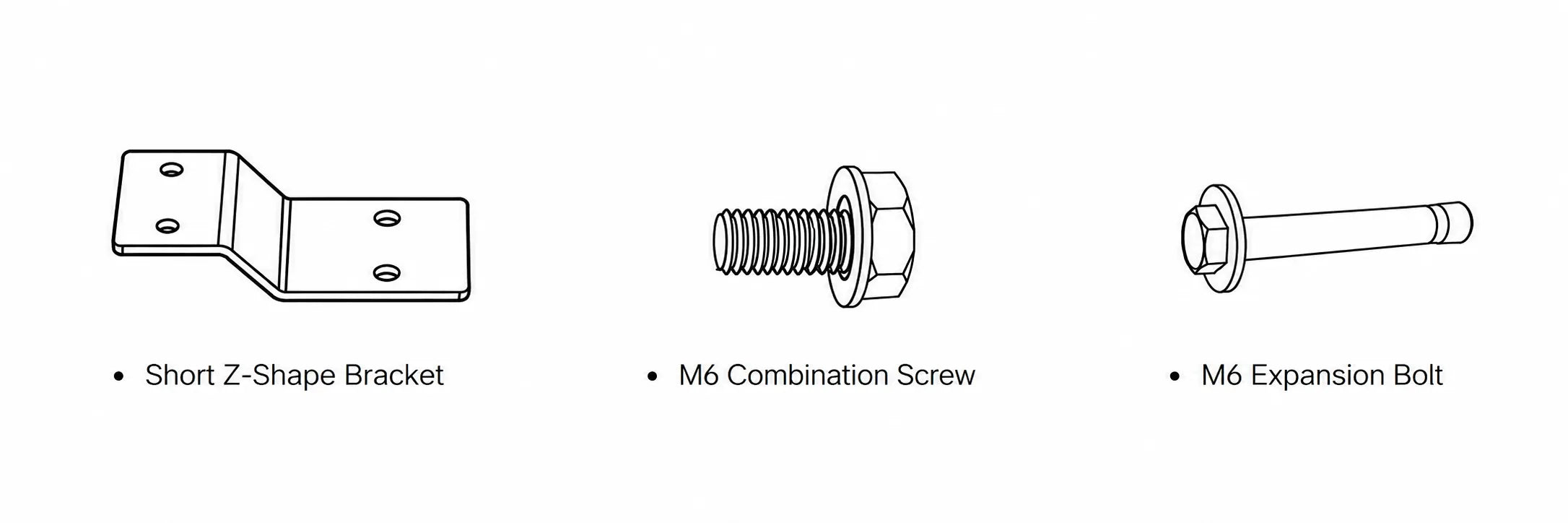
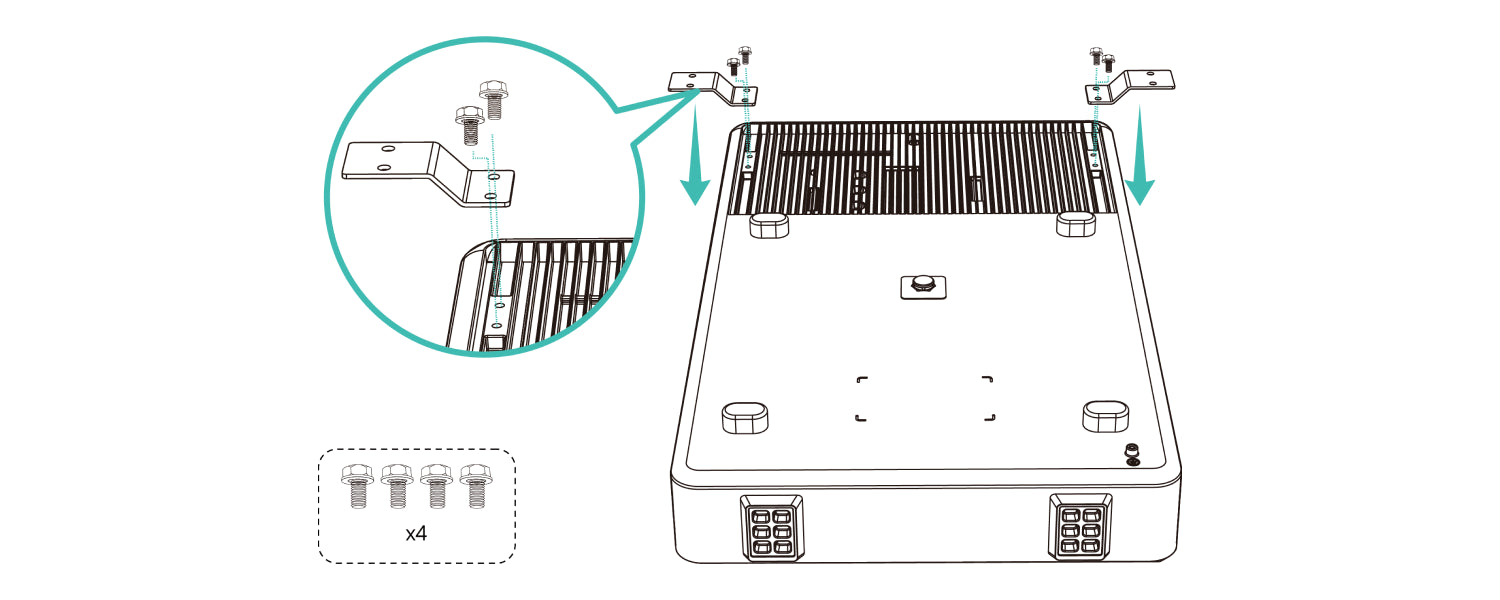
Q: Why does my package include additional Short Z-Shape Brackets?

Some early production units of the Nex E6000 may include additional Short Z-Shape Brackets in the package.

Help Center Image

These brackets are not required for installation and may be safely ignored.

Help Center Image

The Nex E6000 can be securely wall-mounted using the Long Z-Shape Bracket provided with the product.

The presence or absence of the Short Z-Shape Brackets does not affect product safety, performance, or functionality.

NOTE: Please follow the latest installation instructions provided in the user manual.

Q: What are the AC cable specifications for the Nex E Series?

The Nex E Series includes a 1.5 meter AC cable with a Schuko plug. Cable specification: 3 × 1.5 mm².

NOTE: For safe and reliable operation, please use the provided AC cable.

Q: What are the environmental requirements for installing the Nex E Series?

The Nex E Series is designed for both indoor and outdoor use and features an IP65 protection rating.

Recommended operating conditions:

  • Operating temperature: -20°C to 55°C

To ensure long-term performance:

  • Install in a well-ventilated location
  • Avoid corrosive environments, such as areas with high salt concentration or chemical pollutants
  • Avoid locations where water may collect or the unit could get wet for long periods.

The system uses natural cooling and operates at a noise level of ≤25 dB.

NOTE: Installation outside the recommended conditions may affect product performance, service life, or warranty coverage.

Q: What is the difference between the Nex E6000 and Nex E6000H?

The Nex E6000 and Nex E6000H offer the same:

  • Battery capacity
  • Charging and discharging performance
  • Backup power capability
  • Core features and functionality

The main difference is their physical design and installation scenario:

  • Nex E6000 – Slim vertical design, suitable for wall-side installation and compact spaces such as attics or areas with limited floor space.
  • Nex E6000H – Horizontal design, suitable for standard floor installation in utility rooms, garages, and similar spaces.

In short: Same performance, different form factors for different installation environments.

Q: What is the Nex E Series and who is it for?

The Nex E Series is a plug-and-play home battery system designed to help reduce electricity costs through flexible energy storage. It can be used with or without solar panels.

It allows you to:

  • Store excess solar energy generated during the day for use at night, increasing solar self-consumption
  • Store electricity when prices are low and use it when electricity prices are high
  • Keep essential devices running during a power outage

Ideal for:

  • Homes with solar panels looking to increase solar self-consumption
  • Homes with dynamic electricity pricing (e.g., Netherlands)
  • Users who want energy savings without complex installation
Q: Do I need solar panels to use the Nex E Series?

No. The Nex E Series can operate without solar panels and can charge directly from the electricity grid.

When paired with solar panels, it stores excess solar energy for later use, helping increase solar self-consumption and reduce reliance on grid electricity.

It can also store electricity during lower-cost periods and use it when prices are higher.

Q: Can I connect solar panels directly to the Nex E Series?

No. The Nex E Series does not support direct PV (solar panel) connection.

Solar panels must first be connected to a compatible solar inverter, which converts solar energy into AC electricity. The Nex E Series can then store this energy in the home's electrical system.

Q: Why is the Nex E Series on-grid output limited to 800W?

To comply with the regulations applicable in certain countries and regions, the Nex E Series is configured with a default on-grid output limit of 800W.

Under normal grid-connected operation:

  • On-grid mode: Default output limit of up to 800W
  • Off-grid mode: Up to 2600W output

Where permitted by local regulations, the on-grid output limit can be configured up to 2600W.

Please ensure that any configuration changes comply with applicable local laws, regulations, and grid connection requirements.

Q: What is the maximum charging power of the Nex E Series?

The Nex E Series supports a maximum charging power of 2600W.

This enables fast charging during low-price electricity periods, allowing the battery to be ready for use when electricity prices are higher.

Q: Can the Nex E Series provide backup power during outages?

Yes. The Nex E Series provides up to 2600VA off-grid backup power, allowing essential household devices to continue operating during a power outage.

Typical supported loads include:

  • Refrigerator
  • Router / Wi-Fi
  • Lighting
  • TV
  • Laptop
  • Small household appliances

The system also supports a short-term peak output of up to 3640VA for 10 seconds, helping handle the startup surge power of common household appliances such as refrigerators, freezers, and washing machines.

NOTE:

  • The total connected load must remain within the system's output limits.
  • High-power appliances such as ovens, electric heaters, EV chargers, and similar devices may exceed the available backup power.
Q: How does the Nex E Series help reduce electricity costs?

The Nex E Series reduces electricity costs by optimizing electricity usage in the home. When paired with solar panels, it stores excess solar energy for later use, increasing self-consumption and decreasing reliance on grid electricity.

Even without solar panels, users can already charge during low-price periods and discharge during high-price periods through manual scheduling.

Actual savings depend on factors such as electricity tariffs, solar generation, household consumption, and usage habits.

Q: Do I need professional installation?

The Nex E Series is designed as a plug-and-play system and can be installed without complex electrical work.

  • No modification to the household electrical panel is required
  • Standard operation only requires connection to a household power outlet

However:

  • Installation of accessories such as a smart meter may require a qualified technician
  • Local electrical regulations should always be followed
  • For the E6000 (wall-mounted version), installation should be carried out according to the user manual
Q: Where can I install the Nex E Series?

The Nex E Series is suitable for both indoor and outdoor installation and features an IP65-rated enclosure.

Suitable installation locations include:

  • Garages
  • Utility rooms
  • Balconies
  • Covered outdoor areas
  • Other dry and well-ventilated locations

NOTE: For safety reasons, installation should follow the requirements in the user manual, including correct orientation, clearance, ventilation, and operating conditions.

Q: Is my data secure?

Yes. The Nex E Series is designed with data privacy and security in mind. It complies with GDPR (General Data Protection Regulation) and follows industry best practices to protect user data.

Q: Can the Nex E Series be installed anywhere other than on the floor?

Wall mounting is supported for the Nex E6000 model.

The following requirements must be met:

  • The wall should be structurally sound, such as concrete or brick.
  • The wall must be capable of supporting the system's weight.
  • Adequate ventilation space must be maintained around the unit.
  • Local fire safety requirements should be observed.

NOTE: The Nex E6000H is designed for horizontal floor installation and is not intended for wall mounting.

Always follow the installation instructions provided in the user manual.

Q: What are the AC cable specifications for the Nex E Series?

The Nex E Series includes a 1.5 meter AC cable with a Schuko plug. Cable specification: 3 × 1.5 mm².

NOTE: For safe and reliable operation, please use the provided AC cable.

Q: What are the environmental requirements for installing the Nex E Series?

The Nex E Series is designed for both indoor and outdoor use and features an IP65 protection rating.

Recommended operating conditions:

  • Operating temperature: -20°C to 55°C

To ensure long-term performance:

  • Install in a well-ventilated location
  • Avoid corrosive environments, such as areas with high salt concentration or chemical pollutants
  • Avoid locations where water may collect or the unit could get wet for long periods.

The system uses natural cooling and operates at a noise level of ≤25 dB.

NOTE: Installation outside the recommended conditions may affect product performance, service life, or warranty coverage.

Q: What is the difference between the Nex E6000 and Nex E6000H?

The Nex E6000 and Nex E6000H offer the same:

  • Battery capacity
  • Charging and discharging performance
  • Backup power capability
  • Core features and functionality

The main difference is their physical design and installation scenario:

  • Nex E6000 – Slim vertical design, suitable for wall-side installation and compact spaces such as attics or areas with limited floor space.
  • Nex E6000H – Horizontal design, suitable for standard floor installation in utility rooms, garages, and similar spaces.

In short: Same performance, different form factors for different installation environments.

Q: What is the P2800 Pro and who is it for?

The P2800 Pro is an all-in-one solar battery storage system with built-in PV (MPPT) inputs, allowing solar panels to be connected directly without a separate solar inverter.

The P2800 Pro helps households to:

  • Store solar energy for later use
  • Reduce reliance on grid electricity
  • Lower electricity consumption costs
  • Provide backup power during outages

Ideal for:

  • Balcony solar users
  • Homeowners building a direct solar + storage system
  • Users seeking a simple plug-and-play energy solution
Q: What is the difference between the P2800 Pro and the Nex E Series?

The P2800 Pro is a direct PV input solar + battery system with built-in MPPT (solar charging optimization) controllers.

The Nex E Series is designed to work with existing AC systems and does not support direct solar panel input.

Choose the P2800 Pro if you want:

  • Direct connection to solar panels
  • A new solar + storage installation
  • An integrated all-in-one energy system
Q: Can solar panels be connected directly to the P2800 Pro?

Yes. The P2800 Pro supports direct solar panel connection without a separate solar inverter, using 4 independent MPPT (Maximum Power Point Tracking) channels.

The system typically supports up to 8 standard solar panels, depending on configuration. Under a typical setup, up to 2 solar panels can be connected in parallel to each MPPT channel.

The total solar input capacity is up to 3600W (combined across all MPPT channels).

To ensure safe operation, each MPPT channel supports:

  • Voltage range: 12V – 60V DC
  • Maximum current: 32A

NOTE:

  • The open-circuit voltage (Voc) of the solar panel connected to each MPPT channel must not exceed 60V DC. Exceeding this limit may prevent the system from operating properly and can result in permanent damage to the product.
  • Connecting solar panels in series is not permitted, as it may cause the input voltage to exceed the supported range.
  • If you are not familiar with solar panel specifications, it is recommended to connect only one solar panel per MPPT channel. Before connecting multiple solar panels, please verify that the panel specifications comply with the system requirements and refer to the user manual.
Q: What is the maximum charging and output power of the P2800 Pro?

The P2800 Pro supports:

  • Maximum charging power: 2400W
  • Maximum on-grid output power: Default limit of 800W
  • Maximum off-grid output power: 2400VA

To comply with regulations applicable in certain countries and regions, the P2800 Pro is configured with a default on-grid output limit of 800W.

Where permitted by local regulations, the on-grid output limit can be configured up to 2400W.

Please ensure that any configuration changes comply with applicable local laws, regulations, and grid connection requirements.

Q: Can I expand the battery capacity of the P2800 Pro?

Yes. The P2800 Pro includes a built-in battery and supports up to 5 additional battery expansion packs.

Maximum configuration: 1 × P2800 Pro + 5 battery expansion packs

Adding expansion packs increases total energy storage capacity and extends runtime. For example:

  • Longer backup duration during power outages
  • More stored solar energy available for later use

NOTE: Adding expansion packs does not increase the system's charging or output power.

Q: Why is PV input 3600W but charging power lower?

The PV input rating (3600W) is the maximum solar generation capacity, not constant charging power.

Actual charging depends on:

  • Sunlight conditions
  • Battery status
  • System limits

PV input capacity (3600W) represents the maximum solar generation supported, while battery charging power is limited by system design. This is normal for all solar systems.

Q: Can the P2800 Pro provide backup power during outages?

Yes. The P2800 provides up to 2400VA off-grid backup power. Typical supported loads include:

  • Lighting
  • Router / Wi-Fi
  • Refrigerator
  • Television
  • Laptop
  • Small household appliances

The system also supports short-term peak loads of up to 3360VA for 10 seconds, helping accommodate the temporary startup power required by appliances such as refrigerators, freezers, and washing machines.

Q: How does the P2800 Pro help reduce electricity costs?

The P2800 Pro helps reduce electricity costs by increasing the use of self-generated solar energy and reducing reliance on grid electricity.

By storing excess solar energy generated during the day and making it available when needed, the system helps maximize solar self-consumption and reduce the amount of electricity purchased from the grid.

Users can already charge during low-price periods and discharge during high-price periods through manual scheduling.

Actual savings vary depending on solar generation, electricity tariffs, household consumption, system configuration, and usage patterns.

Q: Do I need professional installation?

No.

The P2800 Pro is designed as a plug-and-play energy storage system.

  • No separate solar inverter is required
  • Solar panels can be connected directly
  • No complex electrical modifications are required for standard operation

However:

  • Local electrical regulations should always be followed
  • Installation of accessories such as the smart meter may require a qualified technician
Q: Where can I install the P2800 Pro?

The P2800 Pro is designed for both indoor and outdoor installation and features an IP65-rated enclosure, providing protection against dust and water jets.

It is suitable for installation in:

  • Balcony
  • Garage
  • Utility room
  • Covered outdoor areas

For safe and reliable operation:

  • Install in a well-ventilated and dry location
  • Avoid areas with high humidity or corrosive environments
  • Avoid locations where water may collect or the unit could get wet for long periods.

NOTE: Installation outside recommended conditions may affect system performance or long-term reliability.

Q: Is my data secure?

Yes.

The P2800 Pro is designed in compliance with GDPR (General Data Protection Regulation) and follows industry best practices to protect user data.

Q: What is the SAMDUO P1 Meter?

The SAMDUO P1 Meter is an energy monitoring device that reads data from a compatible smart meter through its P1 port and sends the data to the SAMDUO energy management system.

With the P1 Meter connected, you can view your home energy use, grid import, and grid export in the SAMDUO App. This data also helps the SAMDUO energy storage system manage energy more intelligently.

Q: Is my electricity meter compatible with the SAMDUO P1 Meter?

The SAMDUO P1 Meter is compatible with Dutch and Belgian electricity meters that support a P1 interface and DSMR 4.x/5.x.

Compatible Electricity Meters

BrandCompatible Models
Landis+GyrE360, E360 AM3D, E350 E0035, E360 CM3D, E360 3P, E360 CD2D
SiconiaXT211, DT211, T211, S211
KAIFAMA304, MA304 E0079, MA105, MA105 E0078
ENEXIS ZIVE0090
ISKRAAM550 ED1.01, AM550 ED1.04, AM550 TD2.01, AM550 TD2.04, AM550 TD2.05
ElgamaG15, G35
SagemcomS210, XS210, T210-D

If your electricity meter is not listed above, we recommend contacting your local grid operator to confirm whether your meter supports a compatible P1 interface and DSMR protocol.

Alternatively, please send your meter model and a photo of the meter to support@samduo.com, and we'll check the compatibility for you.

Q: How does the P1 Meter work?

The P1 Meter connects to the P1 port of a compatible smart meter and reads whole-home energy data, such as total power, total energy consumption, and grid import/export.

The data is synced to the SAMDUO App, where you can view your home energy flow. It also provides the real-time household energy data required for Self-Consumption Mode and AI Mode.

Q: Do I need a CT to view solar generation in the SAMDUO App?

In most cases, the P1 Meter does not require an additional CT. Through the P1 connection, it can read your home's energy data, including grid import and export.

However, the P1 connection alone does not provide the actual output of a third-party solar inverter. If you want to view solar generation in the SAMDUO App, an additional CT is required to monitor the inverter's output.

NOTE: For safety, CT installation must be carried out by a qualified electrician in accordance with local electrical regulations.

Q: Does the P1 Meter support Wi-Fi and Bluetooth?

Yes. The P1 Meter supports 2.4 GHz Wi-Fi and Bluetooth, and connects to a compatible smart meter through its P1 (DSMR) port.

Q: Can I see the energy use of individual appliances in the SAMDUO App?

No. The P1 Meter monitors whole-home energy data, including:

  • Real-time household power
  • Total household energy consumption
  • Grid import
  • Grid export
  • Overall household energy trends

It cannot identify how much electricity is being used by individual appliances such as an air conditioner, heat pump, EV, or refrigerator.

Q: Do I need a separate P1 Meter for each SAMDUO energy storage unit?

No.

If multiple SAMDUO E Series or P Series energy storage units are installed in the same home, only one P1 Meter or Smart Meter is needed, regardless of the number of energy storage units.

The meter provides whole-home energy data, which can be shared by all SAMDUO energy storage units in the same home.

Q: What is the warranty for the P1 Meter?

The P1 Meter comes with a 3-year limited warranty.

If you experience any issues, please contact our Support Team at support@samduo.com or submit a request through the Contact Us page on the SAMDUO Official Website. We will help you troubleshoot the issue and provide the appropriate after-sales support.

We recommend keeping your proof of purchase for warranty and support purposes.

Q: Do I need a P1 Meter to use the SAMDUO energy storage system?

No. A SAMDUO P1 Meter is not required for the energy storage system to operate.

Without a compatible device that provides real-time home energy data, you can still use:

  • Custom Mode: Set charging and discharging schedules based on your electricity tariff and energy use.
  • Emergency Backup Mode: Provides backup power during a power outage.

However, we recommend using a compatible energy monitoring device to access complete real-time home energy data and more energy management features.

To use Self-Consumption Mode or AI Mode, or view complete home energy flow in the SAMDUO App, a compatible energy monitoring device is required.

Q: Can I use my existing smart meter or energy monitoring device with the SAMDUO energy storage system?

Yes. The SAMDUO energy storage system is compatible with the following SAMDUO and third-party energy monitoring devices that provide real-time home energy data.

Device TypeCompatible DeviceHow it Connects
SAMDUO DeviceSAMDUO Smart MeterUses CTs to collect household energy data and sync it to the SAMDUO system and App
SAMDUO DeviceSAMDUO P1 MeterReads data from a compatible smart meter through its P1 port
Third-Party DeviceShelly Pro 3EM / HomeWizard P1 Meter / EVERHOME EcoTrackerProvides home energy data to the SAMDUO energy storage system

If your device is not listed above, please send the model number, product photos to support@samduo.com, and we'll check whether your device is compatible.

Q: What is the difference between the P1 Meter and Smart Meter, and which one should I choose?

Both the P1 Meter and Smart Meter provide real-time home energy data to the SAMDUO energy storage system, but they are designed for different home installations.

If your home already has a compatible electricity meter with a P1 port, we recommend the P1 Meter. It offers a simple plug-and-play connection and usually does not require professional installation.

If your electricity meter does not have a compatible P1 port, we recommend the Smart Meter. It is installed in your home's electrical distribution board and requires installation by a qualified electrician or authorized installer.

If you are unsure which one is right for your home, please send your electricity meter model and a photo of the meter to support@samduo.com, and we'll help you choose the appropriate option.

Q: Is my data secure when using the P1 Meter?

SAMDUO takes user privacy and data security seriously. The SAMDUO P1 Meter complies with applicable GDPR requirements, and SAMDUO follows industry best practices to protect user data.

Q: How do I install the P1 Meter?

The SAMDUO P1 Meter is designed for plug-and-play installation. In most cases, simply connect it to the P1 port of a compatible smart meter. The P1 Meter is normally powered directly by the smart meter.

For DSMR 4.0 smart meters, an additional 5V / 1A power adapter is required.

After connecting the device, please follow the instructions in the SAMDUO P1 Meter User Manual to complete setup.

NOTE: If you need to install an additional CT to monitor a third-party solar inverter, the CT must be installed by a qualified electrician in accordance with local requirements.

Q: Do I need a professional installer to set up the P1 Meter?

For a standard P1 connection, usually not. The SAMDUO P1 Meter is designed for plug-and-play installation and can normally be connected to a compatible smart meter without professional assistance. For detailed setup instructions, please refer to the SAMDUO P1 Meter User Manual.

However, if an additional CT is required to monitor a third-party solar inverter, the installation involves household electrical circuits and must be carried out by a qualified electrician.

Q: Where can I install the P1 Meter?

The SAMDUO P1 Meter is designed for indoor residential meter locations and requires a compatible smart meter with a P1 port and a stable communication connection.

  • Operating temperature: -20°C to 55°C
  • Recommended operating humidity: ≤85% RH, non-condensing

Avoid installing the device in locations exposed to extreme temperatures, high humidity, or other adverse environmental conditions.

Q: What is the SAMDUO Smart Meter?

The SAMDUO Smart Meter measures the real-time energy flow between your home and the grid.

With the Smart Meter installed, you can view household energy use, grid import, and grid export in the SAMDUO App. The real-time data also enables energy management features such as Self-Consumption Mode and AI Mode.

Q: Do I need a Smart Meter to use the SAMDUO energy storage system?

No. A SAMDUO Smart Meter is not required for the energy storage system to operate.

Without a compatible device that provides real-time home energy data, you can still use:

  • Custom Mode: Set charging and discharging schedules based on your electricity tariff and energy use.
  • Emergency Backup Mode: Provides backup power during a power outage.

However, we recommend using a compatible energy monitoring device to access complete real-time home energy data and more energy management features.

To use Self-Consumption Mode or AI Mode, or view complete home energy flow in the SAMDUO App, a compatible energy monitoring device is required.

Q: Can I use my existing smart meter or energy monitoring device with the SAMDUO energy storage system?

Yes. The SAMDUO energy storage system is compatible with the following SAMDUO and third-party energy monitoring devices that provide real-time home energy data.

Device TypeCompatible DeviceHow it Connects
SAMDUO DeviceSAMDUO Smart MeterUses CTs to collect household energy data and sync it to the SAMDUO system and App
SAMDUO DeviceSAMDUO P1 MeterReads data from a compatible smart meter through its P1 port
Third-Party DeviceShelly Pro 3EM / HomeWizard P1 Meter / EVERHOME EcoTrackerProvides home energy data to the SAMDUO energy storage system

If your device is not listed above, please send the model number, product photos to support@samduo.com, and we'll check whether your device is compatible.

Q: Does the Smart Meter support Wi-Fi, Bluetooth, and LAN?

Yes. The Smart Meter supports 2.4 GHz Wi-Fi, Bluetooth, and LAN connectivity.

Q: What is the maximum current supported by the Smart Meter?

The Smart Meter supports up to 100 A per phase.

Q: Does the Smart Meter support both single-phase and three-phase systems?

Yes. The Smart Meter supports both single-phase and three-phase residential electrical systems.

Q: Can I see the energy use of individual appliances in the SAMDUO App?

No. The Smart Meter monitors whole-home energy data, including:

  • Real-time household power
  • Total household energy consumption
  • Grid import
  • Grid export
  • Overall household energy trends

It cannot identify how much electricity is being used by individual appliances such as an air conditioner, heat pump, EV, or refrigerator.

Q: Do I need a separate Smart Meter for each SAMDUO energy storage unit?

No.

If multiple SAMDUO E Series or P Series energy storage units are installed in the same home, only one P1 Meter or Smart Meter is needed, regardless of the number of energy storage units.

The meter provides whole-home energy data, which can be shared by all SAMDUO energy storage units in the same home.

Q: Can the Smart Meter help balance my three-phase home energy use?

Yes. The SAMDUO Smart Meter monitors energy use across L1, L2, and L3 and works with the SAMDUO energy storage system to help manage energy use across the three phases.

To help reduce grid import on a specific phase, a SAMDUO energy storage unit must be connected to that same phase. For example, if one phase has a higher load, the energy storage unit connected to that phase can adjust its power output based on the measured load to help reduce grid import on that phase.

NOTE: This power compensation is based on whole-home energy measurement and does not mean electricity is physically transferred from one phase to another. If one phase is consistently connected to multiple high-power appliances, we still recommend distributing household loads appropriately.

Q: What is the difference between the P1 Meter and Smart Meter, and which one should I choose?

Both the P1 Meter and Smart Meter provide real-time home energy data to the SAMDUO energy storage system, but they are designed for different home installations.

If your home already has a compatible electricity meter with a P1 port, we recommend the P1 Meter. It offers a simple plug-and-play connection and usually does not require professional installation.

If your electricity meter does not have a compatible P1 port, we recommend the Smart Meter. It is installed in your home's electrical distribution board and requires installation by a qualified electrician or authorized installer.

If you are unsure which one is right for your home, please send your electricity meter model and a photo of the meter to support@samduo.com, and we'll help you choose the appropriate option.

Q: What is the warranty for the Smart Meter?

The SAMDUO Smart Meter comes with a 3-year limited warranty.

If you experience any issues, please contact our Support Team at support@samduo.com or submit a request through the "Contact Us" page on the SAMDUO Official Website. We will help you troubleshoot the issue and provide the appropriate after-sales support.

We recommend keeping your proof of purchase for warranty and support purposes.

Q: Is my data secure when using the Smart Meter?

SAMDUO takes user privacy and data security seriously. The SAMDUO Smart Meter complies with applicable GDPR requirements, and SAMDUO follows industry best practices to protect user data.

Q: Do I need a professional electrician to install the Smart Meter?

Yes. For safety and proper installation, we recommend having the SAMDUO Smart Meter installed by a qualified electrician or authorized installer.

The Smart Meter is installed in your home's electrical distribution board, and the installation must be completed in accordance with local electrical regulations.

For detailed installation and setup guidance, please refer to the SAMDUO Smart Meter User Manual.

Q: Where can I install the Smart Meter?

The Smart Meter is designed for indoor residential electrical distribution boards and is installed on a DIN rail.

The operating temperature range is -20°C to 55°C. Please install the Smart Meter in a dry, suitable location within the electrical distribution board and avoid environments exposed to extreme temperatures or other adverse conditions.